Learning Objectives
- Master the fundamental storage equation: Source → Medium → Interface → Target
- Understand storage hierarchy from CPU registers to archival storage
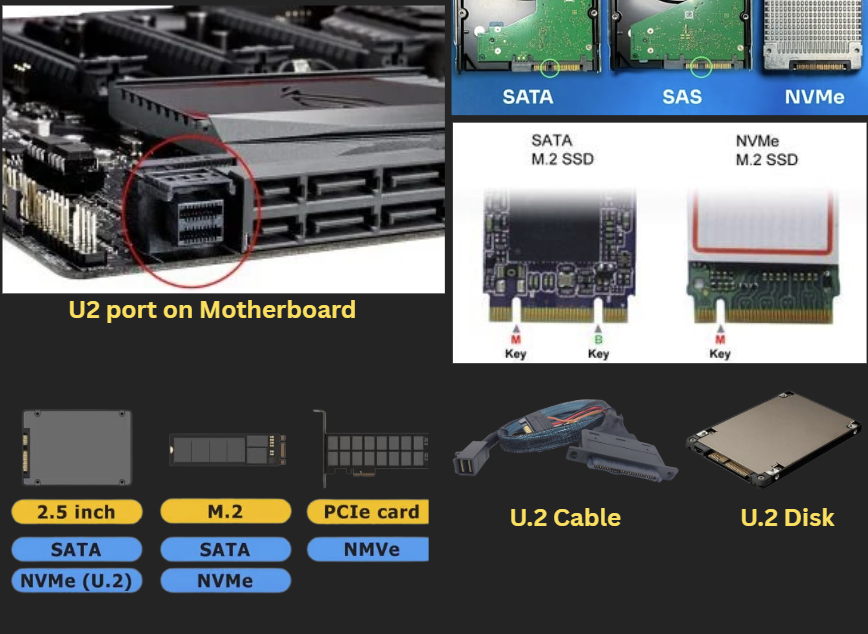
- Compare and contrast local storage technologies (IDE/PATA, SATA, SCSI, SAS, NVMe)
- Distinguish between external storage types (DAS, NAS, SAN, NVMe-oF)
- Learn proper disk preparation procedures (partition, format, mount)
- Explain the role and benefits of RDMA in storage networking
- Differentiate between block-level, file-level, and object storage
- Map traditional storage concepts to modern cloud services (AWS)
- Apply storage concepts to real-world scenarios and troubleshooting
1. Introduction to Storage Technologies
Welcome to this comprehensive Storage Crash Course! This tutorial is designed to benefit anyone working in cloud, on-premises, or any technical field. Understanding how storage works, its various types, and their functions is fundamental to modern computing.
Why This Course Matters: Storage is the foundation of all computing systems. Whether you're managing a single PC or designing enterprise cloud infrastructure, these concepts will clarify many dimensions of storage and open new avenues to understand internal workings.
This course will provide a simplified understanding that will clarify storage concepts even for experienced professionals, helping you understand the factors for choosing one storage type over another.
Universal Principle: All storage systems, regardless of complexity, operate on the same fundamental architecture. Understanding this core principle will help you work with any storage technology, from simple USB drives to enterprise cloud storage.
2. Basic PC Storage Structure
To begin our journey, let's visualize the simplified structure of storage inside a PC:
┌─────────────┐ ┌──────────────────┐ ┌─────────────┐
│ Motherboard │────│ Controller/ │────│ Hard Disk │
│ │ │ Initiator │ │ │
└─────────────┘ └──────────────────┘ └─────────────┘
│ │
│ Data Cable │ Power Cable
│ │
┌─────────────┐ ┌─────────────┐
│ Interface │ │ Power │
│ Socket │ │ Connection │
└─────────────┘ └─────────────┘
Key Components:
- Controller/Initiator: Acts as the "brain" that issues commands to the hard disk
- Data Cable: Connects the controller to the hard disk for data operations
- Power Cable: Provides electrical power to operate the hard disk
- Interface: The socket where the data cable connects to receive data operations
Key Insight: The controller/initiator is called an "initiator" because it initiates commands. These commands can be for writing, reading, or any other operation on the disk media.
3. Data Flow: How Applications Interact with Storage
Understanding the complete data flow from application to storage device is crucial for comprehending storage technologies.
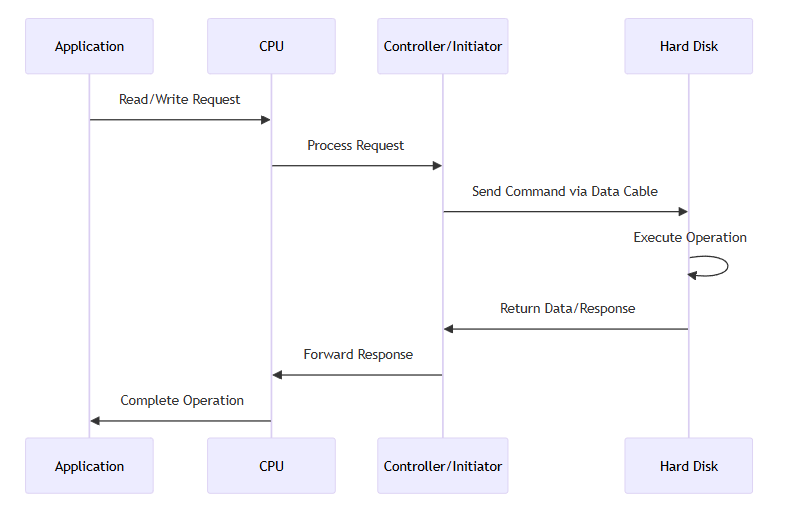
Step-by-Step Data Flow Process:
1
Application Request: An application wants to read or write something on the hard disk
2
CPU Processing: The request first goes to the CPU for processing
3
Controller Communication: The CPU communicates with the Controller/Initiator
4
Command Transmission: The controller sends a command to the hard disk via the data cable
5
Execution: The command is executed on the hard disk
6
Response Return: The output/response is sent back to the controller
7
Completion: The controller forwards the response to the requesting application
4. The Fundamental Storage Equation
To simplify our understanding of all storage technologies, we introduce this fundamental equation that applies universally:
SOURCE → MEDIUM → INTERFACE → TARGET
┌─────────────┐ ┌─────────────┐ ┌─────────────┐ ┌─────────────┐
│ SOURCE │───▶│ MEDIUM │───▶│ INTERFACE │───▶│ TARGET │
│ │ │ │ │ │ │ │
│ Initiator/ │ │ Cables, │ │ Connection │ │ Hard Disk, │
│ Controller │ │ Network, │ │ Points, │ │ Storage │
│ │ │ Fabric │ │ Sockets │ │ Device │
└─────────────┘ └─────────────┘ └─────────────┘ └─────────────┘
| Component |
Function |
Examples |
| Source |
Initiates and controls storage operations |
IDE Controller, SATA Controller, HBA |
| Medium |
Carries data between source and target |
PATA Cable, SATA Cable, Ethernet, Fibre Channel |
| Interface |
Connection point on target device |
IDE Socket, SATA Port, Network Interface |
| Target |
Stores and retrieves data |
Hard Disk, SSD, Storage Array |
Critical Principle: Any change in the technology of one part of this equation will affect the others. For example, if you change the medium, it must be compatible with both the source and the target's interface.
5. Storage Hierarchy: Speed vs Cost
Storage components are organized in a hierarchy based on their speed, cost, and capacity. Understanding this hierarchy is crucial for system design and optimization.
┌─────────────────────────────────────────────────────────────────────────────────┐
│ STORAGE SPEED & COST HIERARCHY │
├─────────────────────────────────────────────────────────────────────────────────┤
│ │
│ 🔥 FASTEST & MOST EXPENSIVE 🔥 │
│ │
│ ┌─────────────────┐ │
│ │ CPU REGISTERS │ ◄─── 1 CPU cycle │
│ │ (Fastest) │ │
│ └─────────────────┘ │
│ ||| │
│ vvv │
│ ┌─────────────────────┐ │
│ │ CACHE (L1/L2/L3) │ ◄─── Few cycles │
│ │ (CPU integrated) │ │
│ └─────────────────────┘ │
│ ||| │
│ vvv │
│ ┌─────────────────────────┐ │
│ │ RAM │ ◄─── ~100 cycles │
│ │ (Main Memory) │ (VOLATILE) │
│ └─────────────────────────┘ │
│ ||| │
│ vvv │
│ ┌───────────────────────────────┐ │
│ │ SSD │ ◄─── ~100,000 │
│ │ (Solid State Drive) │ cycles │
│ └───────────────────────────────┘ │
│ ||| │
│ vvv │
│ ┌─────────────────────────────────────┐ │
│ │ HDD │ ◄─── Millions │
│ │ (Hard Disk Drive) │ of cycles │
│ └─────────────────────────────────────┘ │
│ ||| │
│ vvv │
│ ┌─────────────────────────────────────────────┐ │
│ │ ARCHIVAL STORAGE │ ◄─── Very │
│ │ (Tape, Cloud Cold Storage) │ Slow │
│ └─────────────────────────────────────────────┘ │
│ │
│ ❄️ SLOWEST & LEAST EXPENSIVE ❄️ │
│ │
└─────────────────────────────────────────────────────────────────────────────────┘
Understanding Each Level:
- CPU Registers: Fastest and smallest storage, directly within the CPU (1 cycle access)
- Cache: Multiple layers (L1, L2, L3) within CPU, faster than RAM (few cycles)
- RAM: Main memory, volatile storage (~100 cycles), data lost when power removed
- SSD: Non-volatile flash storage (~100,000 cycles), much faster than HDDs
- HDD: Mechanical storage (millions of cycles), slowest but cost-effective
- Archival: Long-term storage like tape or cold cloud storage (very slow access)
Virtual Memory/Paging/Swapping:
When RAM becomes full, the operating system can extend memory by moving less-used data to disk storage (paging/swapping). This allows systems to run applications larger than available RAM, though with significant performance implications due to the speed difference between RAM and storage.
Storage Selection Factors:
- Data Access Frequency: Hot data (frequently accessed) vs. Cold data (rarely accessed)
- Performance Requirements: Required processing speed and response time
- Data Longevity: How long the data needs to be retained
- Budget Constraints: Balance between performance and cost
- Capacity Needs: Total amount of data to be stored
6. Local Storage Technologies
Local disks are storage devices internal to a PC, server, or laptop. Over time, numerous technologies have emerged, each involving specific protocols and command sets.
Key Concepts:
- Protocol: Organizes the communication between devices
- Command Set: Defines what actions can be performed (read, write, etc.)
IDE/PATA
→
SATA
→
SCSI
→
SAS
→
NVMe
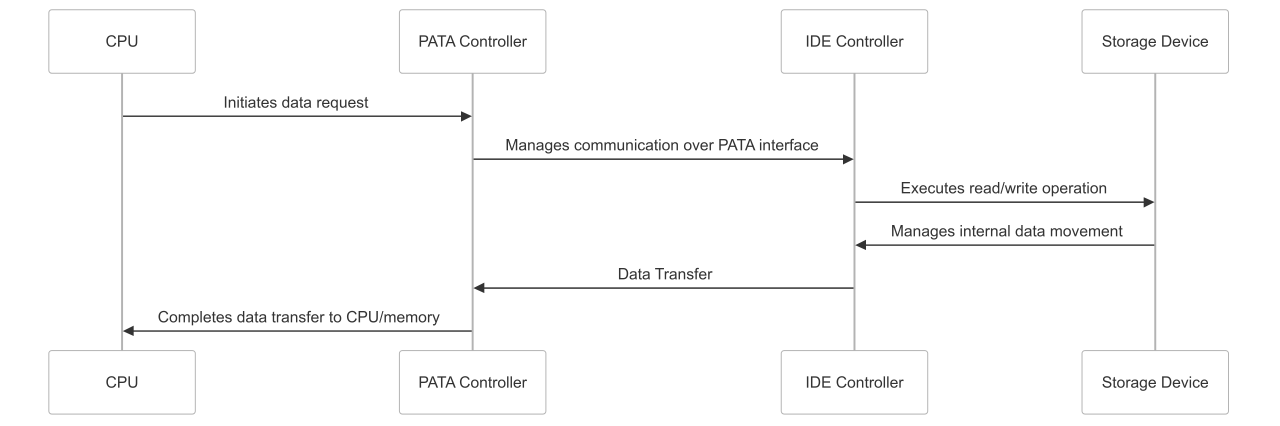
6.1 IDE (Integrated Drive Electronics) / PATA (Parallel ATA)
Characteristics:
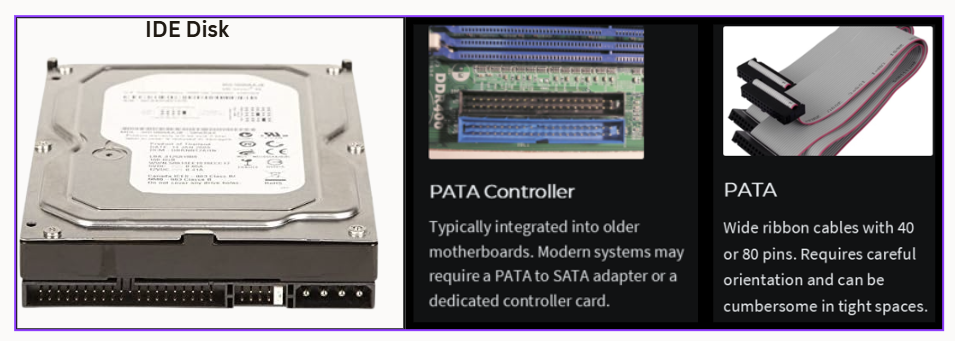
- Technology: One of the earliest technologies for hard disks, CD-ROMs, and DVD writers
- Protocol: ATA (Advanced Technology Attachment) protocol and command set
- Data Transfer: Parallel ATA (PATA) - data transferred in parallel
- Device Limit: Typically supported two disks: Master and Slave (controlled by physical jumper)
- Physical Appearance: Wide ribbon cables that could impede airflow
Limitations:
- No hot-swapping support
- Performance limitations due to parallel interference
- Higher power consumption
- Limited cable length
- Complex master/slave configuration
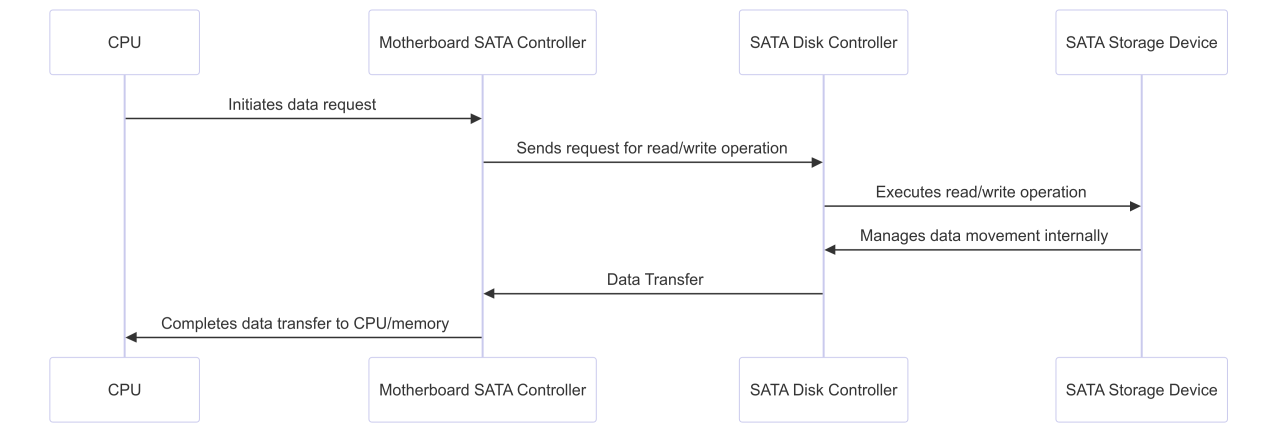
6.2 SATA (Serial ATA) & AHCI
Evolution and Improvements:
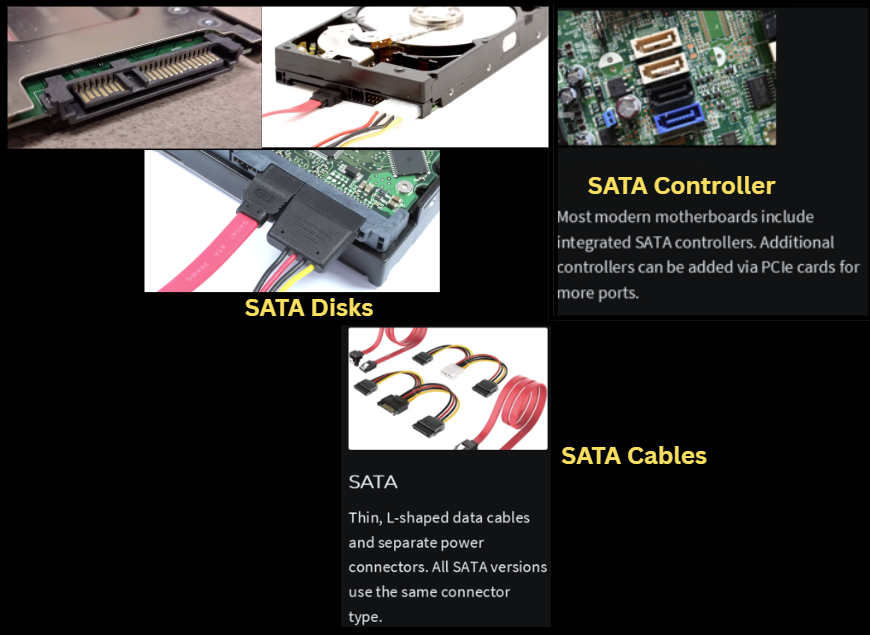
- Technology: Successor to PATA with serial data transfer
- Physical Improvement: Smaller serial cables replacing bulky parallel cables
- Individual Connections: Dedicated cable per drive, eliminating master/slave complexity
- Better Airflow: Thinner cables improve case ventilation
AHCI (Advanced Host Controller Interface):
AHCI Revolution: AHCI was introduced to unlock SATA's full potential:
- Native Command Queuing (NCQ): Allows drives to optimize command execution order
- Hot-swapping support: Add/remove drives without system shutdown
- Better power management: Advanced power saving features
- Improved performance: More efficient command processing than legacy IDE mode
Critical Configuration Note: AHCI must be enabled in BIOS/UEFI settings. If not enabled, the system operates in legacy IDE compatibility mode, missing these advanced benefits. This is a common source of suboptimal performance in SATA systems.
| Feature |
IDE Mode |
AHCI Mode |
| Command Queuing |
Basic |
Native Command Queuing (NCQ) |
| Hot Swapping |
Not supported |
Supported |
| Power Management |
Limited |
Advanced |
| Performance |
Limited by legacy protocols |
Optimized for modern drives |
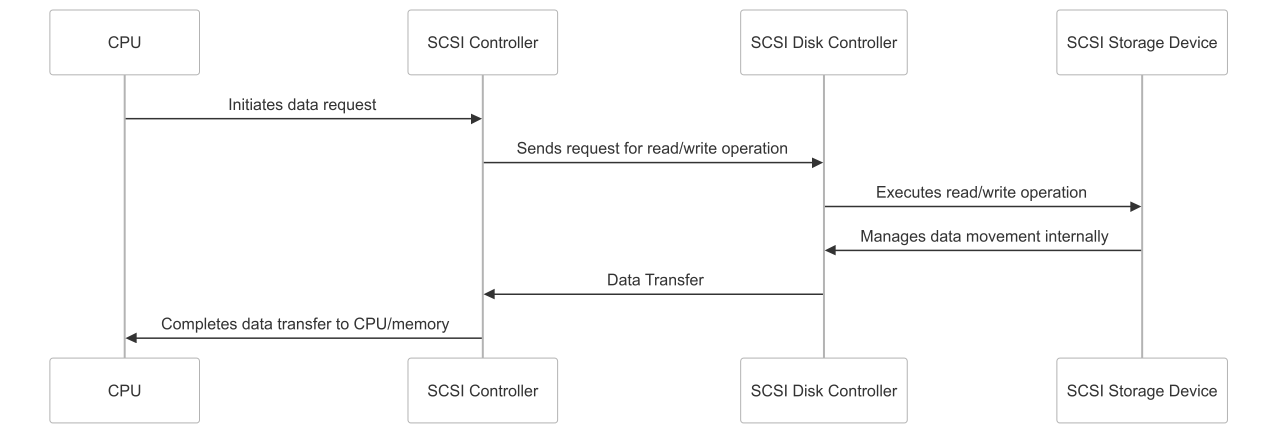
6.3 SCSI (Small Computer System Interface)
┌─────┐ ┌──────────────┐ ┌─────────────┐ ┌─────────────┐
│ CPU │───▶│ SCSI │───▶│ SCSI │───▶│ SCSI Disk │
│ │ │ Controller │ │ Cable │ │ Array │
│ │ │ (PCI Card) │ │ (Parallel) │ │ │
└─────┘ └──────────────┘ └─────────────┘ └─────────────┘
│ │
┌─────────────┐ ┌─────────────┐
│ Extended │ │ Multiple │
│ Length │ │ Device │
│ Support │ │ Support │
└─────────────┘ └─────────────┘
SCSI Features:
- Controller: Often external PCI card rather than integrated motherboard controller
- Multiple Devices: Support for connecting many disks to a single controller
- Addressing: Devices addressed using schemes like C0T1D0 (Controller 0, Target 1, Disk 0)
- Cable Length: Extended lengths of several meters possible
- Protocol: Own SCSI protocols and command sets, more robust than ATA
- Enterprise Focus: Designed for server and enterprise environments
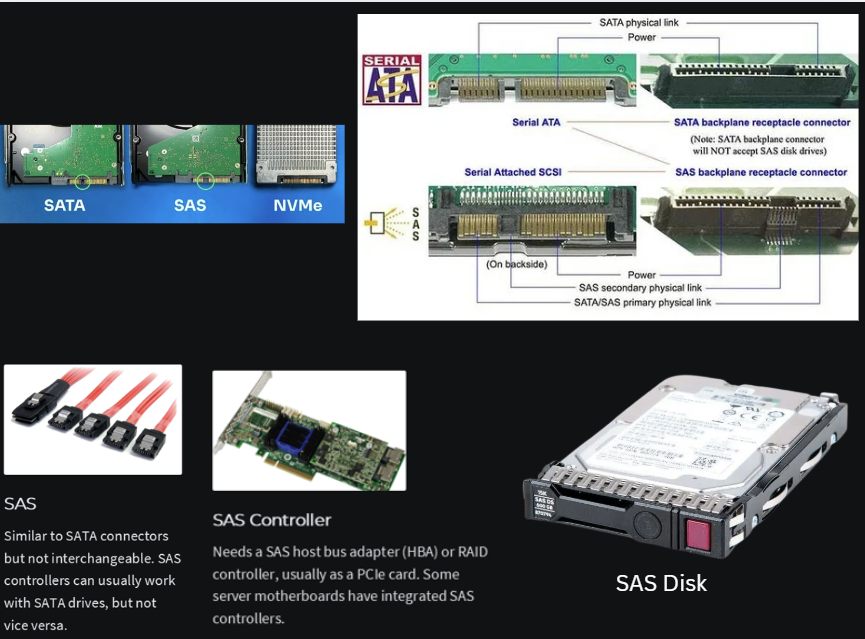
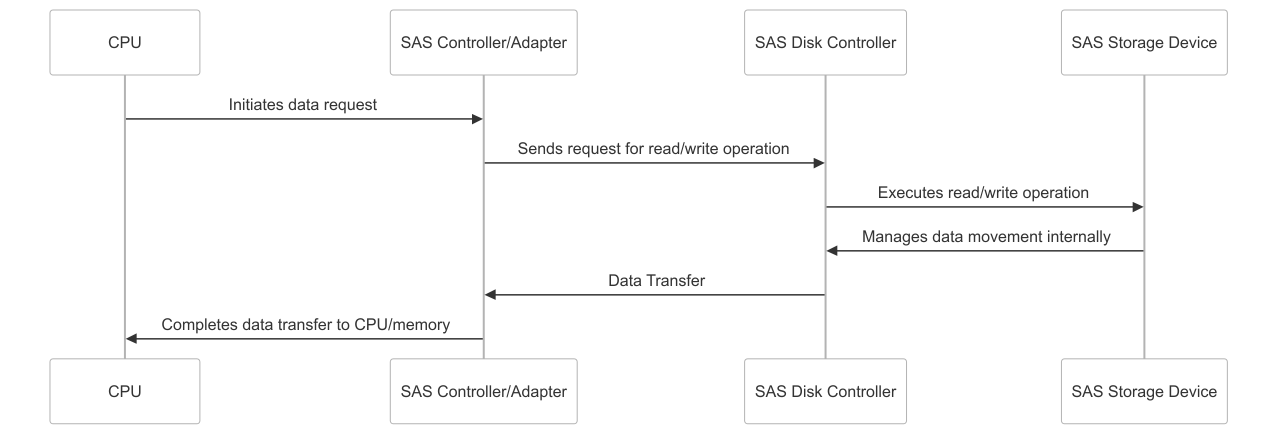
6.4 SAS (Serial Attached SCSI)
| Feature |
SCSI |
SAS |
| Cable Type |
Parallel |
Serial |
| Protocol |
SCSI |
SCSI (maintained) |
| Controller |
PCI Card |
PCIe Card |
| Drive Types |
HDD primarily |
HDD and SSD |
| Compatibility |
SCSI only |
SAS and SATA drives |
SAS Advantage: SAS controllers can typically connect to both SAS and SATA disks, but SATA controllers can only connect to SATA disks. This provides excellent flexibility in enterprise environments.
6.5 NVMe (Non-Volatile Memory Express)
The SSD Performance Problem:
While SSDs offered significant speed advantages over HDDs, connecting them via SATA interfaces (even with AHCI) created a bottleneck that prevented SSDs from reaching optimal performance.
Analogy: It's like having a powerful, high-speed sports car (SSD) but fueling it with low-quality gasoline (SATA protocol), resulting in significantly reduced performance.
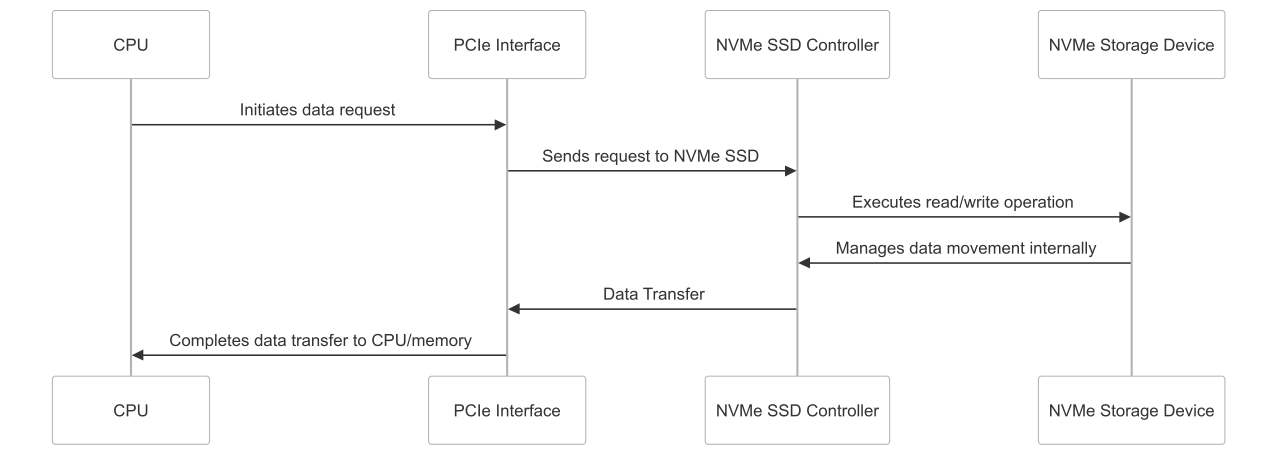
┌─────┐ ┌──────────────┐ ┌─────────────────────┐
│ CPU │───▶│ PCIe Express │───▶│ NVMe Storage Device │
│ │ │ Interface │ │ (with integrated │
│ │ │ (No Cables) │ │ controller) │
└─────┘ └──────────────┘ └─────────────────────┘
│ │
┌─────────────┐ ┌─────────────┐
│ Direct │ │ NVMe │
│ PCIe Slot │ │ Namespaces │
│ Connection │ │ │
└─────────────┘ └─────────────┘
NVMe Advantages:
- Direct Connection: Plugs directly into PCIe slot (no cables)
- Dedicated Protocol: Own NVMe protocol and command set designed for high-speed operations
- Parallel Operations: Supports multiple parallel commands (up to 65,535 queues)
- Integrated Controller: Controller built into the storage device
- Low Latency: Minimized latency by bypassing traditional storage controllers
- High IOPS: Significantly higher input/output operations per second
NVMe Namespaces:
Namespaces vs Partitions:
- Traditional disks use logical partitions created by the OS
- NVMe introduces Namespaces - native, high-performance logical units
- Namespaces can be treated as independent disks
- Support parallel operations and commands
- Can be shared over networks (NVMe-oF)
- Provide better isolation and management than traditional partitions
7. Steps to Prepare a New Hard Disk
Before a new hard disk can be used, several essential steps are required. This process is universal and applies to all storage devices.
Universal Process: These steps apply whether you're preparing a USB drive, internal HDD, SSD, SAN LUN, or any other storage device. The underlying principles remain the same regardless of storage technology.
- Connect and Make Online/Active:
- Physical Connection: Connect the disk to the system via appropriate cables or network
- Detection: Ensure the operating system detects and recognizes the disk
- Online Status: The disk must appear as "online" and "active" in system management tools
- Partitioning (Optional but Recommended):
- Purpose: Dividing a large disk into smaller, manageable logical units
- Benefits: Isolates data (OS vs. user data), reduces risk of total data loss
- Flexibility: Different partitions can use different file systems
- Management: Easier backup and maintenance strategies
- Formatting with a Specific File System:
- File System Options: NTFS, FAT32 (Windows); ext4, XFS, Btrfs (Linux)
- Function: Creates the structure for organizing files and folders
- Block Creation: Divides the partition into smaller logical units called blocks
- Metadata: Establishes structures for file metadata and permissions
- Mount Point Creation (Gateway to Access):
- Windows: Drive letters (C:, D:) or mount to empty folders
- Linux: Mount to directory paths (e.g., /mnt/data)
- Purpose: Provides access point for applications and users
- Critical: Without a mount point, formatted storage cannot be accessed
- Ready for Use:
- Create folders and files
- Set permissions and security
- Begin normal read/write operations
Mount Point Demonstration Example
Windows Mount Point Example:
Scenario: External hard disk connected but not visible in "This PC"
- Access Disk Management: Right-click Start → Disk Management
- Identify Disk: Find the external disk (shows as "Online" but no drive letter)
- Assign Drive Letter: Right-click partition → "Change Drive Letter and Paths" → Add → Select letter (F:)
- Alternative - Folder Mount: Mount to empty folder (C:\External Hard Disk Demo)
- Result: Disk becomes accessible through assigned drive letter or folder path
DISK PREPARATION FLOW:
Raw Device ──► Detection ──► Partition ──► Format ──► Mount ──► Ready
│ │ │ │ │ │
▼ ▼ ▼ ▼ ▼ ▼
Connected OS Sees It Logical Split File Sys Access Usable
Point
8. External Storage Systems
External storage refers to storage systems that are separate from the host server or PC. The primary reason for external storage is to decouple storage from the processing unit.
Benefits of External Storage:
- Resilience: Data remains accessible even if the server fails
- Accessibility: Multiple hosts can access the same storage
- Scalability: Storage can be expanded independently of compute resources
- Centralized Management: Easier backup, replication, and maintenance
- Resource Optimization: Shared storage reduces total cost of ownership
8.1 DAS (Direct Attached Storage)
DAS Characteristics:
- Connection: Direct connection to a single host via adapter card (HBA)
- Distance: Relatively close to host (typically up to 5 meters for SCSI)
- Dedicated: Storage unit dedicated to one host
- Internal Flexibility: Can contain various disk types internally
- External Box: Unlike local storage, DAS is housed in external enclosure
DAS Data Flow:
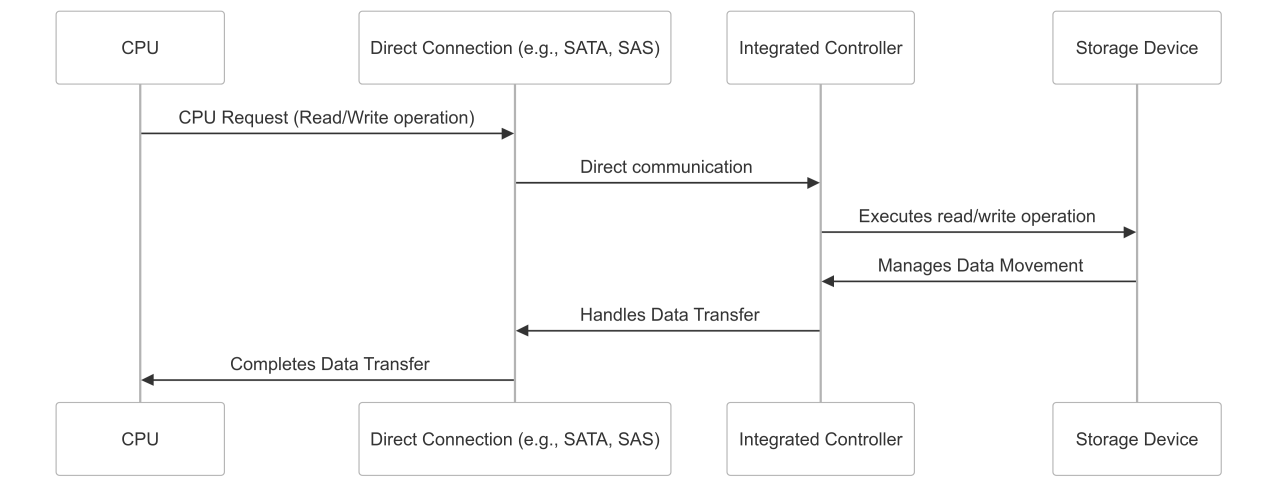
1
CPU request goes to Host Interface/Controller (adapter card)
2
Interface communicates through connecting cable to storage unit
3
Storage unit's controller processes commands on internal devices
4
Response follows reverse path back to CPU
DAS Limitations:
- Limited by cable length constraints
- Typically single-host access (not shared)
- Requires dedicated interface card (HBA) on server
- Less flexible than networked storage solutions
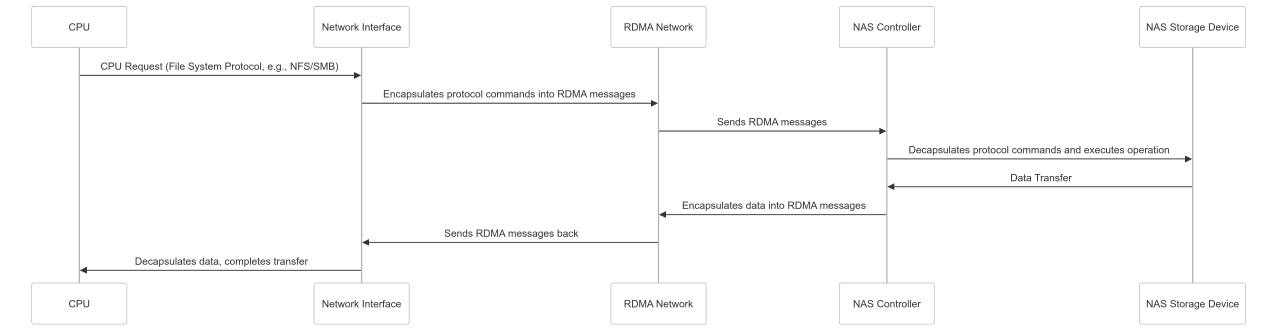
8.2 NAS (Network Attached Storage)
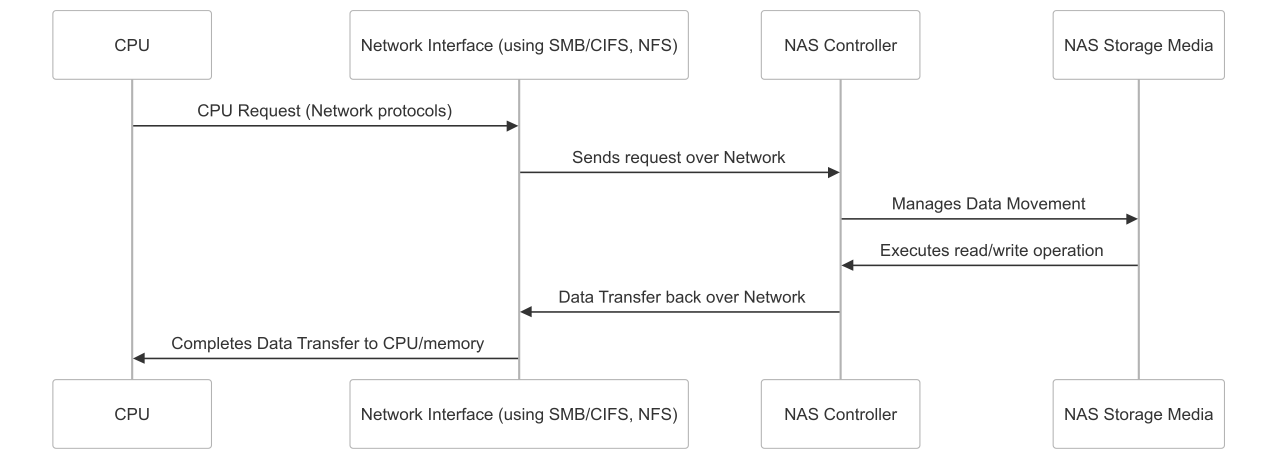
NAS provides file-level access to storage over a standard network. Clients see and interact with files and folders, not raw disk blocks.
| Operating System |
Protocol |
Use Case |
| Windows |
SMB/CIFS |
File sharing, mapped drives |
| Linux/Unix |
NFS |
Mount points, distributed file systems |
| Cross-platform |
SMB + NFS |
Mixed environments |
NAS with Traditional Ethernet:
NAS with RDMA Acceleration:
Built-in Synchronization: File-sharing protocols (NFS, SMB) inherently include synchronization mechanisms, preventing data corruption when multiple clients access the same files.
NAS Operation Details:
- Device Management: NAS has its own OS managing underlying disks
- Client Access: Clients "mount" shared folders as if they were local drives
- File-Level Operations: Users work with files and folders, not raw blocks
- Protocol Translation: NAS handles protocol conversion between network and storage
8.3 SAN (Storage Area Network)
SAN provides block-level access to storage over a dedicated high-speed network. Hosts see storage as raw, unformatted disk blocks.
SAN Storage Virtualization:
┌─────────────────────────────────────────────────┐
│ Storage Pool │
│ ┌─────┐ ┌─────┐ ┌─────┐ ┌─────┐ ┌─────┐ │
│ │Disk1│ │Disk2│ │Disk3│ │Disk4│ │Disk5│ │
│ └─────┘ └─────┘ └─────┘ └─────┘ └─────┘ │
└─────────────────┬───────────────────────────────┘
│ Storage Virtualization
▼
┌─────────────────────────────────────────────────┐
│ LUNs │
│ ┌─────────┐ ┌─────────┐ ┌─────────┐ │
│ │ LUN 1 │ │ LUN 2 │ │ LUN 3 │ │
│ │ (100GB) │ │ (50GB) │ │ (200GB) │ │
│ └─────────┘ └─────────┘ └─────────┘ │
└─────────────────────────────────────────────────┘
LUN (Logical Unit Number): SAN aggregates multiple physical disks into a storage pool. From this pool, LUNs are created - essentially virtual disks that appear as raw block devices to connected servers.
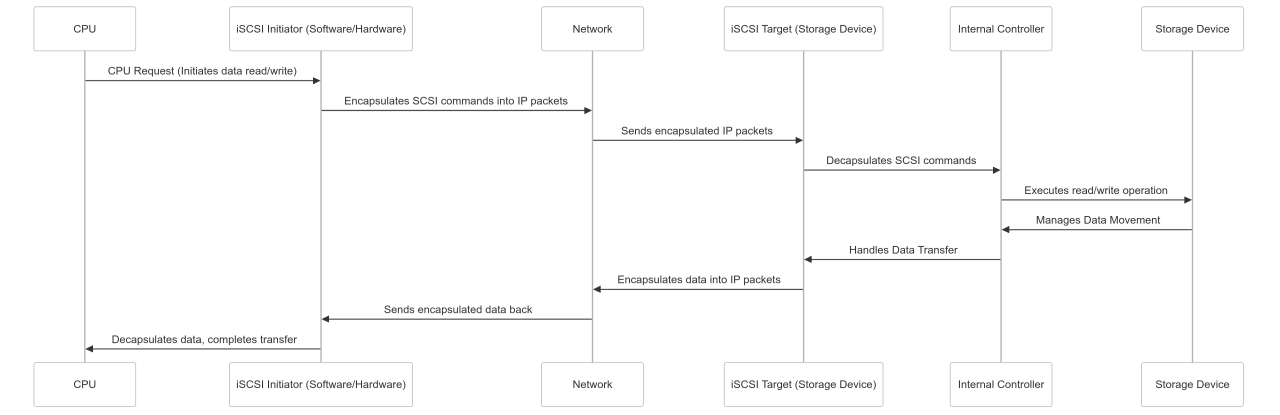
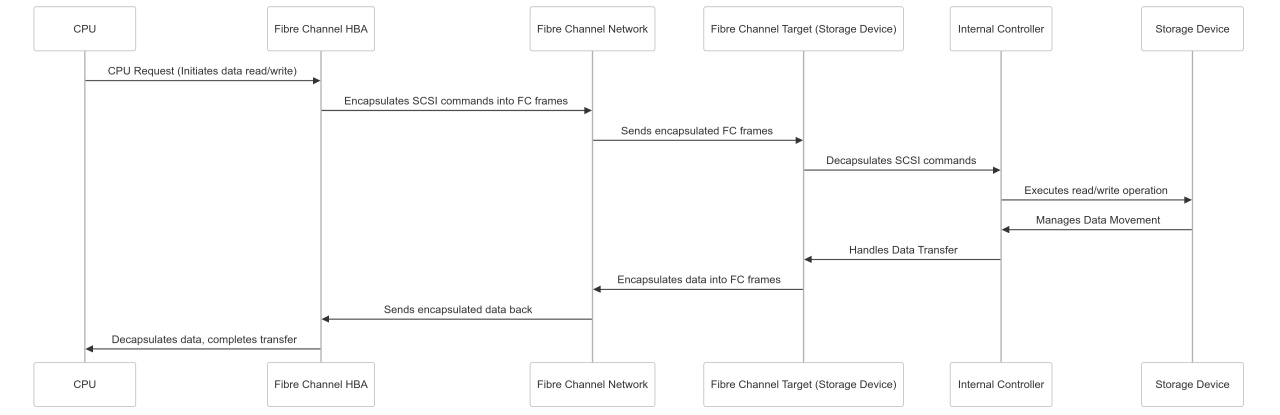
SAN Protocol Comparison:
| Protocol |
Medium |
Commands |
Advantages |
| iSCSI |
Ethernet |
SCSI in TCP/IP |
Uses existing network infrastructure |
| Fibre Channel |
Fibre Optic |
SCSI in FC frames |
Dedicated, high-performance network |
| FCoE |
Ethernet |
FC frames over Ethernet |
Converged network infrastructure |
iSCSI Process Flow:
Fibre Channel Process Flow:
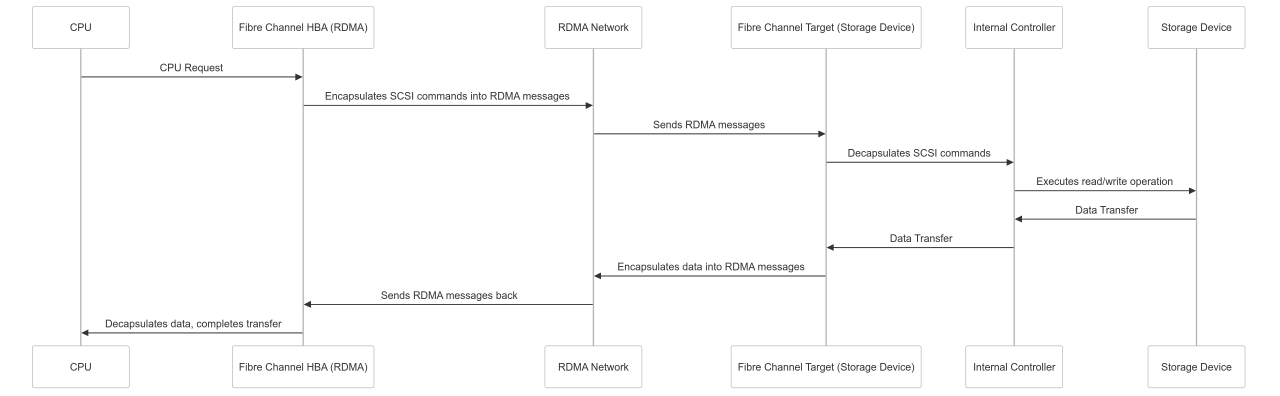
Fibre over RDMA Process Flow:
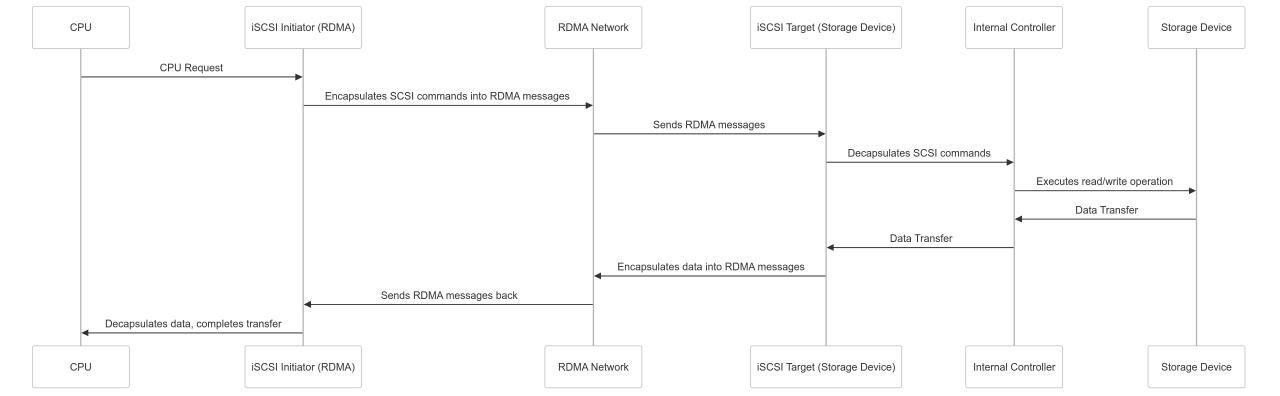
iSCSI over RDMA Process Flow:
Critical SAN Consideration - Clustering Required: When multiple servers share the same block-level storage (LUN), they must use Cluster File Systems (e.g., VMware VMFS, OCFS2). Standard file systems (NTFS, ext4) cannot handle concurrent writes from multiple servers, leading to data corruption.
8.4 NVMe over Fabrics (NVMe-oF)
NVMe over Fabrics extends the high performance of NVMe technology over network fabrics, allowing NVMe namespaces to be shared as block storage over networks.
| Transport |
Medium |
Commands |
Performance |
| NVMe/TCP |
Ethernet |
NVMe in TCP packets |
Good |
| NVMe/FC |
Fibre Channel |
NVMe in FC frames |
Better |
| NVMe/RDMA |
InfiniBand/RoCE |
NVMe over RDMA |
Best |
Key Difference: Unlike iSCSI or Fibre Channel which use SCSI commands, NVMe-oF uses native NVMe commands, providing better performance and lower latency optimized for flash storage.
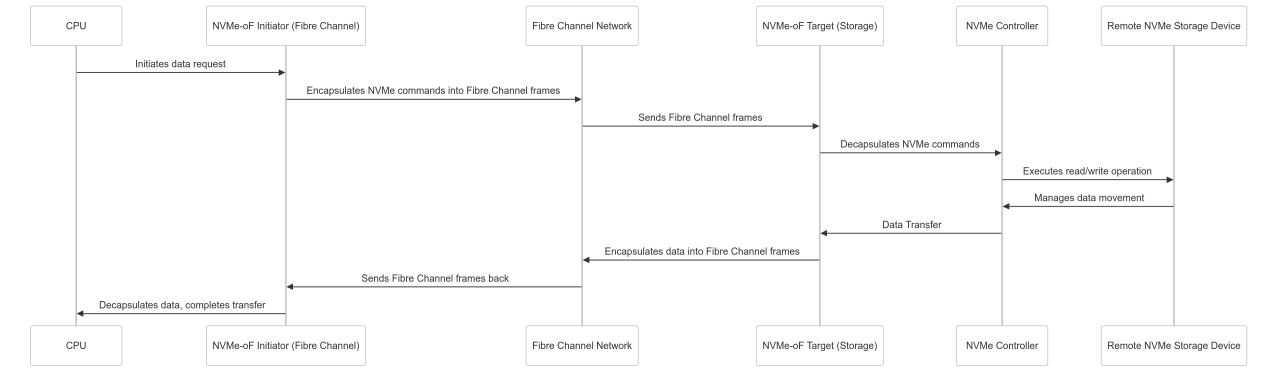
NVMe-oF over Fibre Channel Process Flow:
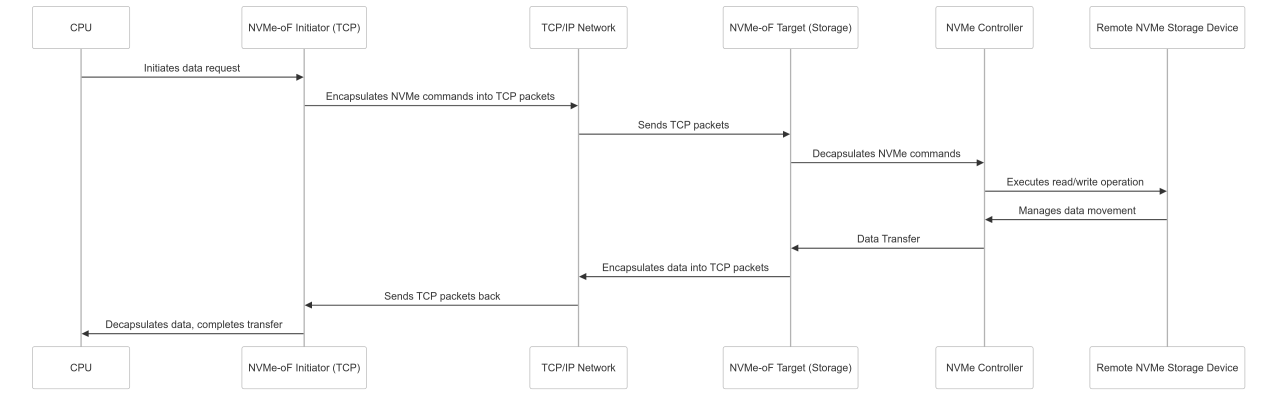
NVMe-oF over TCP Process Flow:
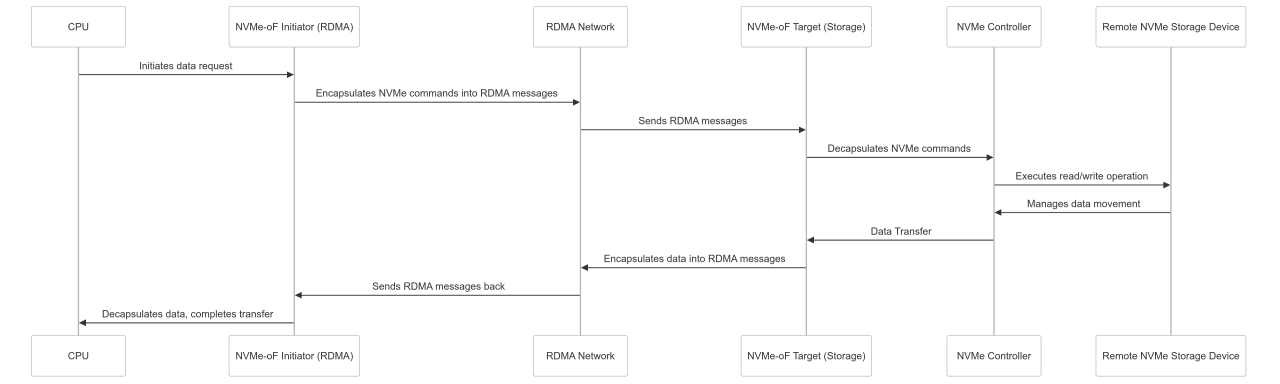
NVMe-oF over RDMA Process Flow:
9. RDMA (Remote Direct Memory Access) Technology
Understanding DMA First:
Before discussing RDMA, let's understand DMA (Direct Memory Access):
Traditional I/O (CPU Involved):
┌─────┐ ┌─────┐ ┌────────┐
│ App │───▶│ CPU │───▶│ Memory │
└─────┘ └─────┘ └────────┘
│
▼
┌─────────┐
│ I/O │
│ Device │
└─────────┘
DMA (CPU Bypassed):
┌─────┐ ┌────────┐
│ App │────────▶│ Memory │
└─────┘ └────────┘
▲
│
┌─────────┐
│ I/O │
│ Device │
│ (DMA) │
└─────────┘
DMA Problem Solved: In early systems, the CPU had to be involved in copying data from RAM, which was inefficient. DMA allows I/O devices to directly access memory without CPU intervention, significantly improving performance.
RDMA Concept:
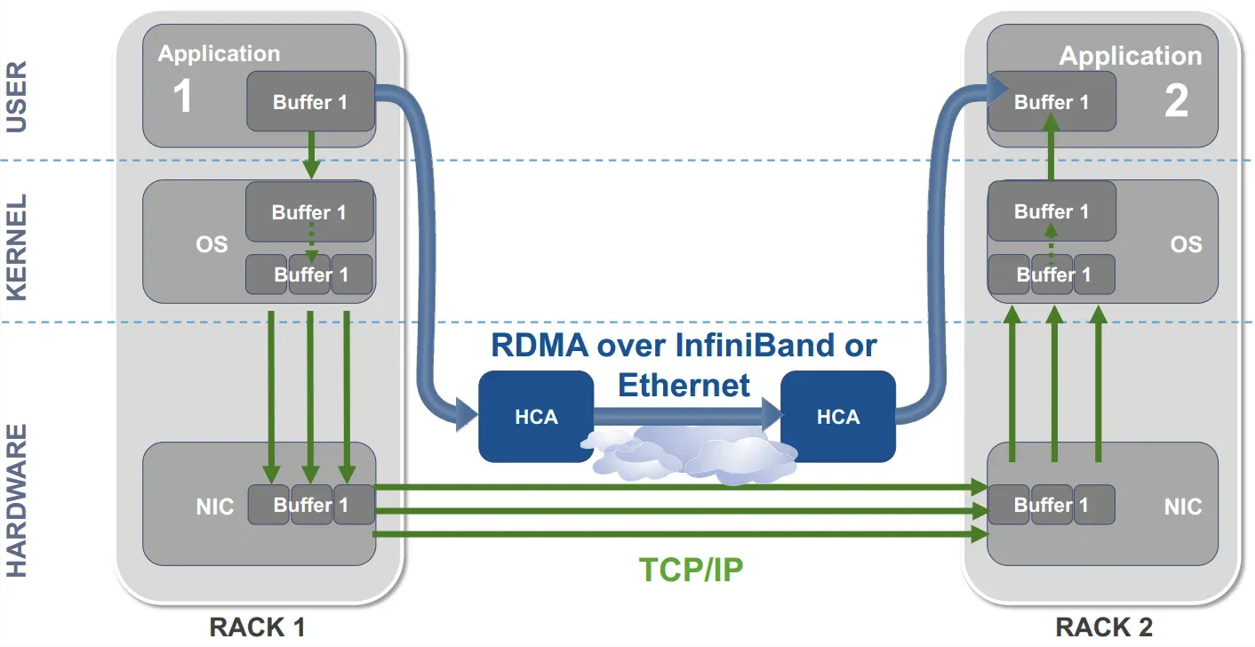
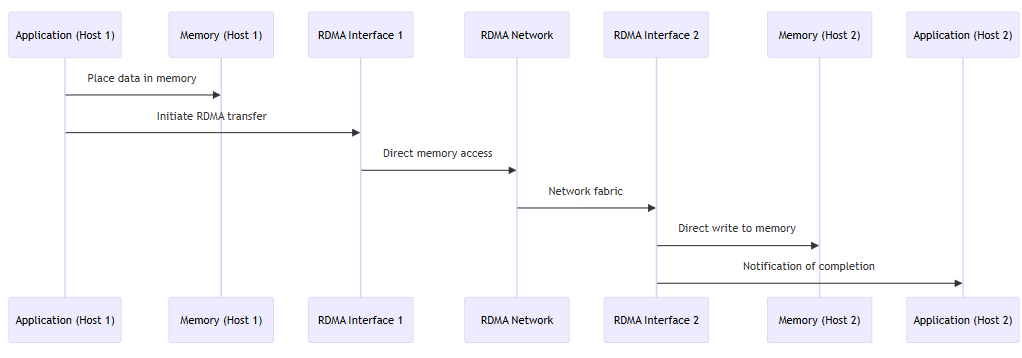
RDMA extends the principle of DMA to networked environments, allowing direct memory-to-memory data transfer between applications on different networked hosts.
| Method |
CPU Involvement |
Network Stack |
Latency |
Throughput |
| Traditional TCP/IP |
High |
Full stack processing |
High |
Limited |
| RDMA |
Minimal |
Bypassed |
Low |
High |
RDMA Process Flow:
RDMA Benefits:
- Low Latency: Bypasses OS network stack
- High Throughput: Direct memory-to-memory transfer
- CPU Offload: Minimal CPU involvement during transfer
- Zero-Copy: Data moves directly without intermediate copying
- Kernel Bypass: Eliminates context switching overhead
RDMA Technologies:
- InfiniBand: High-performance computing and data centers
- RoCE (RDMA over Converged Ethernet): RDMA over standard Ethernet
- iWARP: Internet Protocol-based RDMA
10. Block vs File vs Object Storage
To further categorize storage, we differentiate between three fundamental storage access methods: Block, File, and Object storage.
Access Level Hierarchy: Understanding how data is managed at different levels is crucial for choosing the right storage solution. Each level builds upon the lower levels.
10.1 Block-Level Storage
Block-level storage provides access to raw disk blocks or LUNs, allowing the client to perform partitioning and formatting operations.
BLOCK-LEVEL STORAGE STRUCTURE:
Raw Disk Device (Unformatted Storage)
┌─────────┬─────────┬─────────┬─────────┬─────────┬─────────┐
│ SECTOR │ SECTOR │ SECTOR │ SECTOR │ SECTOR │ SECTOR │
│ 512B │ 512B │ 512B │ 512B │ 512B │ 512B │
│ [0] │ [1] │ [2] │ [3] │ [4] │ [5] │
└─────────┴─────────┴─────────┴─────────┴─────────┴─────────┘
AFTER FORMATTING (File System Creates Blocks):
┌─────────────────────────────────┐ ┌─────────────────────────────────┐
│ BLOCK 1 │ │ BLOCK 2 │
│ (4KB = 8 sectors) │ ... │ (4KB = 8 sectors) │
│ ┌─────┬─────┬─────┬─────┬─────┐ │ │ ┌─────┬─────┬─────┬─────┬─────┐ │
│ │ S0 │ S1 │ S2 │ ... │ S7 │ │ │ │ S8 │ S9 │S10 │ ... │S15 │ │
│ └─────┴─────┴─────┴─────┴─────┘ │ │ └─────┴─────┴─────┴─────┴─────┘ │
└─────────────────────────────────┘ └─────────────────────────────────┘
Block-Level Key Concepts:
- Sectors: Smallest physical unit on disk (typically 512 bytes)
- Blocks: Logical units created by file system during formatting
- Full Control: Complete access to partitioning and formatting
- Foundation: File-level storage is built on top of block-level
Cluster File Systems Required: When multiple hosts access the same block storage simultaneously, cluster file systems (like OCFS2 or VMFS) are required to prevent data corruption.
10.2 File-Level Storage
File-level storage provides access to files and directories after the storage has been mounted and formatted.
FILE-LEVEL STORAGE ABSTRACTION:
FILE SYSTEM LAYER
┌─────────────────┐ ┌─────────────────┐ ┌─────────────────┐
│ INODE │ │ INODE │ │ INODE │
│ 12345 │ │ 12346 │ │ 12347 │
│ │ │ │ │ │
│ Name: doc.pdf │ │ Name: photo.jpg │ │ Name: video.mp4 │
│ Size: 1.2MB │ │ Size: 3.5MB │ │ Size: 150MB │
│ Owner: alice │ │ Owner: bob │ │ Owner: charlie │
│ Perms: 644 │ │ Perms: 755 │ │ Perms: 600 │
│ Blocks: [1-3] │ │ Blocks: [4-11] │ │ Blocks: [12-50] │
└─────────────────┘ └─────────────────┘ └─────────────────┘
||| ||| |||
vvv vvv vvv
┌─────────────────────────────────────────────────────────┐
│ BLOCK LAYER (Hidden from User) │
│ [1][2][3][4][5][6][7][8][9][10][11][12]...[50] │
│ ^^^^^^^^^ ^^^^^^^^^^^^^^^^^^^ ^^^^^^^^^^^^^^^^^^^^ │
│ doc.pdf photo.jpg spans video.mp4 spans │
│ (3 blocks) 8 blocks many blocks │
└─────────────────────────────────────────────────────────┘
Built-in Synchronization: File-sharing protocols inherently include synchronization mechanisms, allowing safe concurrent access by multiple clients.
File-Level Characteristics:
- User Operations: Create, modify, delete files and folders
- iNodes (Metadata): Store file information and pointers to data blocks
- Data Recovery: File deletion often only removes links, enabling recovery
- Built on Blocks: Always requires underlying block-level storage
10.3 Object Storage
Object storage is fundamentally different, storing data as discrete objects within pools or containers.
| Aspect |
Block/File Storage |
Object Storage |
| Data Structure |
Blocks → File System → Files |
Objects in Pools/Containers |
| Identifiers |
Inodes (file system) |
Object IDs |
| Metadata |
File system metadata |
Rich, customizable metadata |
| Access Method |
POSIX, network protocols |
APIs (HTTP/REST) |
| Scalability |
Limited by file system |
Massive scale |
Object Storage Management:
Object Storage APIs:
┌─────────────┐ ┌─────────────┐ ┌─────────────┐
│ Application │───▶│ API │───▶│ Object │
│ │ │ │ │ Storage │
│ PUT Object │ │ HTTP/REST │ │ │
│ GET Object │ │ JSON/XML │ │ Object Pool │
│ DELETE Obj │ │ │ │ │
└─────────────┘ └─────────────┘ └─────────────┘
HTTP Commands:
• PUT - Upload/Write object
• GET - Download/Read object
• DELETE - Remove object
• POST - Update object (varies)
Common Object Storage APIs:
- Swift API: Used by OpenStack for private cloud
- S3 API: AWS standard, widely adopted by other vendors
- S3 Compatible: Ceph, NetApp, Pure Storage, Dell EMC, Scality
Object Storage Limitation: To update a small part of an object, you often need to overwrite the entire object, which can be inefficient for frequently changing data.
Object Storage Characteristics:
- Self-Contained Units: Each object includes data, unique ID, and metadata
- No File System: Objects stored as whole units, not divided into blocks
- API Access: Accessed via APIs, not mounted file systems
- Massive Scalability: Designed for virtually unlimited storage
11. AWS Storage Services Mapping
Amazon Web Services (AWS) offers storage services that align directly with these access levels, providing managed alternatives to traditional on-premises storage infrastructure.
Cloud Translation: AWS services map directly to traditional storage concepts, making it easier to understand cloud storage options when you understand the fundamentals.
Amazon EBS
Elastic Block Store
💽 Block-Level Storage (Cloud SAN)
- Provides block-level storage volumes for EC2 instances
- Volumes need to be partitioned and formatted by user
- Similar to physical hard drive or SAN LUN
- EBS is external block storage, making it a cloud-based SAN
- Supports various volume types (gp3, io2, st1, sc1)
- Built-in redundancy and backup capabilities
Amazon EFS
Elastic File System
📁 File-Level Storage (Cloud NAS)
- Provides shared file storage for Linux instances
- Accessible via NFS protocol
- Multiple instances can access simultaneously
- EFS is external file storage, making it cloud-based NAS
- Automatically scales and manages capacity
- POSIX-compliant file system
Amazon FSx
Fully Managed File Systems
📁 File-Level Storage (Cloud NAS)
- Offers shared file storage for various workloads
- Windows File Server using SMB protocol
- Lustre for high-performance computing
- FSx is also cloud-based NAS
- Active Directory integration
- High-performance options available
Amazon S3
Simple Storage Service
☁️ Object-Level Storage
- Provides scalable object storage
- Data stored as objects in buckets
- Accessed via APIs and web interfaces
- Industry-standard S3 API widely adopted
- Multiple storage classes for different use cases
- Built-in versioning and lifecycle management
Traditional vs. AWS Storage Mapping
| Storage Type |
Traditional Solution |
AWS Equivalent |
Key Benefits |
| Block-Level (SAN) |
Fibre Channel SAN, iSCSI |
Amazon EBS |
Managed infrastructure, elastic scaling |
| File-Level (NAS) - Linux |
NFS appliances |
Amazon EFS |
Fully managed, automatic scaling |
| File-Level (NAS) - Windows |
Windows file servers |
Amazon FSx |
Active Directory integration |
| Object-Level |
On-premises object storage |
Amazon S3 |
Internet scale, global distribution |
Cloud Storage Benefits:
- Managed Infrastructure: AWS handles hardware, networking, and maintenance
- Scalability: Resources scale up or down based on demand
- Reliability: Built-in redundancy and backup capabilities
- Cost Efficiency: Pay only for what you use, no upfront hardware investment
- Global Access: Access data from anywhere with internet connectivity
- Integration: Seamless integration with other AWS services
12. Summary and Conclusion
This comprehensive crash course has covered the fundamental concepts and technologies in storage systems. Let's summarize the key learnings:
The Universal Storage Equation:
SOURCE → MEDIUM → INTERFACE → TARGET
Storage Technology Evolution:
Local Storage
IDE/PATA → SATA → SCSI → SAS → NVMe
→
External Storage
DAS → NAS → SAN → NVMe-oF
Storage Access Methods:
| Access Type |
Level |
Use Cases |
Protocols |
| Block Storage |
Raw blocks/LUNs |
Databases, VMs, high-performance apps |
iSCSI, FC, NVMe-oF |
| File Storage |
Files and directories |
File shares, content repositories |
NFS, SMB/CIFS |
| Object Storage |
Objects with metadata |
Cloud storage, backup, archiving |
S3, Swift APIs |
Key Technology Enablers:
- RDMA: Low-latency, high-throughput networking
- NVMe: High-performance storage with namespaces
- Virtualization: Storage pools and LUNs
- APIs: Programmatic storage management
- AHCI: Advanced features for SATA drives
Critical Takeaway: All storage technologies follow the fundamental Source → Medium → Interface → Target equation. Understanding this relationship helps you choose appropriate technologies and troubleshoot storage issues effectively.
Universal Disk Preparation Process:
- Connect and Detect: Physical connection and OS recognition
- Partition: Divide into logical units (recommended)
- Format: Apply file system and create blocks
- Mount: Create access point (drive letter/directory)
- Use: Ready for files and applications
Future Considerations:
As storage technology continues to evolve, consider these current trends:
- NVMe Adoption: NVMe and NVMe-oF becoming standard for high-performance applications
- Object Storage Growth: Expanding beyond cloud to edge computing and AI/ML workloads
- Storage Class Memory: Intel Optane and similar technologies bridging storage-memory gap
- Computational Storage: Processing capabilities integrated into storage devices
- Software-Defined Storage: Abstraction and automation of storage resources
- Cloud-Native Storage: Container-native and Kubernetes-integrated solutions
- AI-Driven Management: Machine learning for storage optimization and prediction
Complete Understanding Achieved: You now understand storage technologies from hardware fundamentals to cloud services. This knowledge provides the foundation to work with any storage system, troubleshoot issues, and make informed architectural decisions.
Next Steps: Apply these concepts to your specific environment. Consider performance requirements, scalability needs, and budget constraints when selecting storage technologies for your projects.